Hướng dẫn gửi email thông báo bằng ESP32-CAM
Thứ Năm,
12/03/2026
Admin
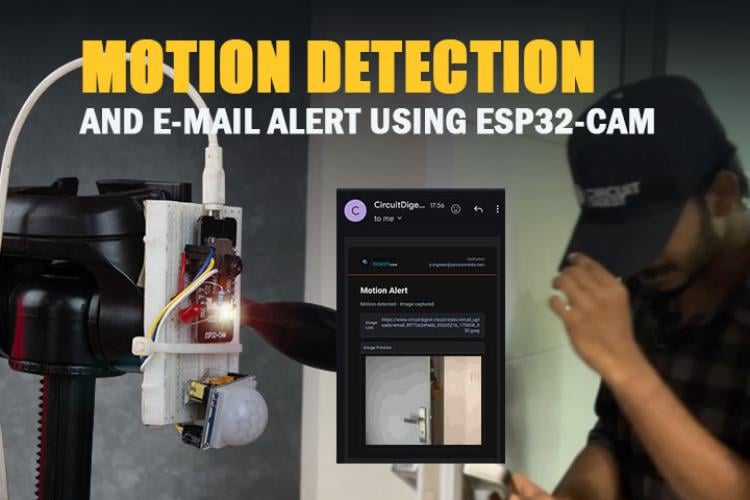
Bài viết này hướng dẫn xây dựng hệ thống phát hiện chuyển động sử dụng ESP32-CAM + cảm biến PIR, tự động chụp ảnh và gửi email thông báo theo thời gian thực.
1. Linh kiện cần chuẩn bị
| STT | Linh kiện | Vai trò |
|---|---|---|
| 1 | ESP32-CAM | Vi điều khiển chính + camera |
| 2 | Cảm biến PIR | Phát hiện chuyển động |
| 3 | Breadboard | Kết nối linh kiện dễ dàng |
| 4 | Dây jumper | Kết nối các chân |
| 5 | LED đỏ | Chỉ thị trạng thái hoạt động |
| 6 | Điện trở 220Ω | Bảo vệ LED |
2. Sơ đồ mạch
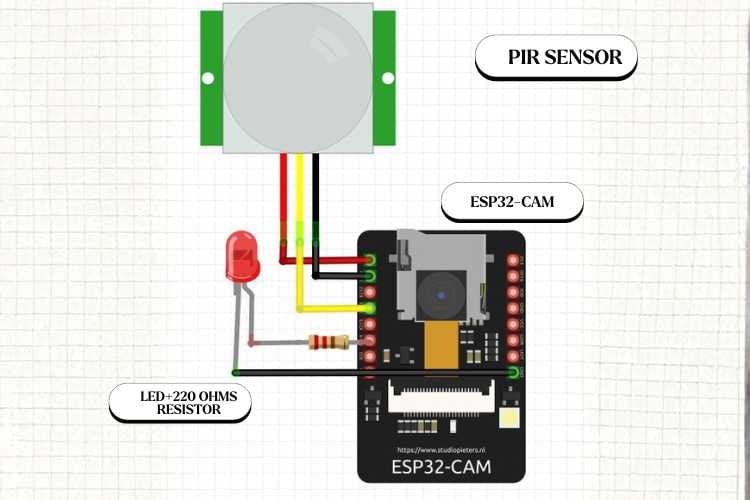
Sơ đồ kết nối ESP32-CAM với cảm biến PIR
Chân OUT của cảm biến PIR nối vào GPIO13 của ESP32-CAM. LED đỏ kết nối qua điện trở 220Ω để chỉ thị trạng thái hệ thống.
3. Lắp ráp phần cứng
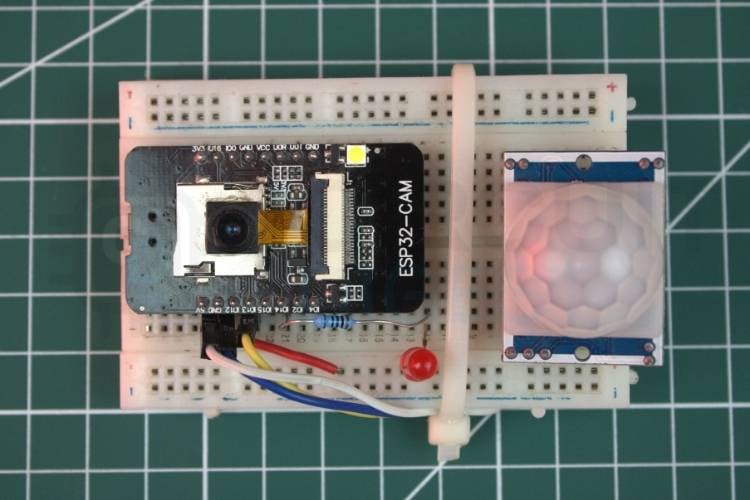
Mạch thực tế sau khi lắp ráp
4. Nguyên lý hoạt động
1
Cảm biến PIR liên tục theo dõi môi trường. Khi phát hiện chuyển động, gửi tín hiệu HIGH lên GPIO13 của ESP32-CAM.
2
ESP32-CAM chờ tín hiệu ổn định 500ms (tránh trigger giả), bật flash LED và chụp ảnh.
3
Ảnh được gửi qua HTTPS POST (multipart/form-data) đến CircuitDigest Cloud API kèm API key.
4
API gửi email đính kèm ảnh. Hệ thống cooldown 15 giây trước khi trigger tiếp theo.
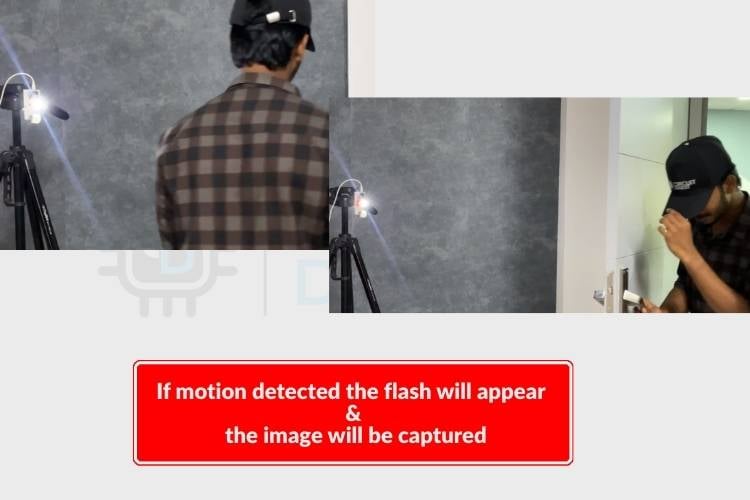
ESP32-CAM chụp ảnh khi phát hiện chuyển động
5. Code Arduino đầy đủ
#include "esp_camera.h"
#include <WiFi.h>
#include <WiFiClientSecure.h>
/* ================= WIFI ================= */
const char* ssid = "yourssid";
const char* password = "yourpassword";
/* ================= EMAIL API ================= */
const char* host = "mshop.io.vn";
const int httpsPort = 443;
const char* apiKey = "yourapikey";
/* ================= PIR SENSOR ================= */
#define PIR_PIN 13
/* ================= LED PINS ================= */
#define RED_LED_PIN 14
#define FLASH_LED_PIN 4
/* ================= ESP32-CAM AI THINKER ================= */
#define PWDN_GPIO_NUM 32
#define RESET_GPIO_NUM -1
#define XCLK_GPIO_NUM 0
#define SIOD_GPIO_NUM 26
#define SIOC_GPIO_NUM 27
#define Y9_GPIO_NUM 35
#define Y8_GPIO_NUM 34
#define Y7_GPIO_NUM 39
#define Y6_GPIO_NUM 36
#define Y5_GPIO_NUM 21
#define Y4_GPIO_NUM 19
#define Y3_GPIO_NUM 18
#define Y2_GPIO_NUM 5
#define VSYNC_GPIO_NUM 25
#define HREF_GPIO_NUM 23
#define PCLK_GPIO_NUM 22
/* ================= SETTINGS ================= */
const unsigned long MOTION_COOLDOWN = 15000; // 15 sec
const unsigned long STABLE_TIME = 500; // 0.5 sec stable detection
const unsigned long LED_BLINK_INTERVAL = 1000;
unsigned long lastMotionTime = 0;
unsigned long lastLedToggle = 0;
bool ledState = false;
/* ================= SETUP ================= */
void setup() {
Serial.begin(115200);
Serial.println("\nESP32-CAM Motion System Starting...");
pinMode(RED_LED_PIN, OUTPUT);
pinMode(FLASH_LED_PIN, OUTPUT);
digitalWrite(RED_LED_PIN, LOW);
digitalWrite(FLASH_LED_PIN, LOW);
pinMode(PIR_PIN, INPUT); // IMPORTANT: No pulldown
Serial.println("Warming up PIR (60 sec)...");
delay(60000);
Serial.println("PIR Ready!");
/* ===== WIFI ===== */
WiFi.begin(ssid, password);
Serial.print("Connecting to WiFi");
while (WiFi.status() != WL_CONNECTED) {
delay(500);
Serial.print(".");
}
Serial.println("\nWiFi Connected!");
/* ===== CAMERA CONFIG ===== */
camera_config_t config;
config.ledc_channel = LEDC_CHANNEL_0;
config.ledc_timer = LEDC_TIMER_0;
config.pin_d0 = Y2_GPIO_NUM;
config.pin_d1 = Y3_GPIO_NUM;
config.pin_d2 = Y4_GPIO_NUM;
config.pin_d3 = Y5_GPIO_NUM;
config.pin_d4 = Y6_GPIO_NUM;
config.pin_d5 = Y7_GPIO_NUM;
config.pin_d6 = Y8_GPIO_NUM;
config.pin_d7 = Y9_GPIO_NUM;
config.pin_xclk = XCLK_GPIO_NUM;
config.pin_pclk = PCLK_GPIO_NUM;
config.pin_vsync = VSYNC_GPIO_NUM;
config.pin_href = HREF_GPIO_NUM;
config.pin_sscb_sda = SIOD_GPIO_NUM;
config.pin_sscb_scl = SIOC_GPIO_NUM;
config.pin_pwdn = PWDN_GPIO_NUM;
config.pin_reset = RESET_GPIO_NUM;
config.xclk_freq_hz = 20000000;
config.pixel_format = PIXFORMAT_JPEG;
config.frame_size = FRAMESIZE_VGA;
config.jpeg_quality = 12;
config.fb_count = 1;
if (esp_camera_init(&config) != ESP_OK) {
Serial.println("Camera Init Failed!");
while (1);
}
Serial.println("System Ready - Monitoring...");
}
/* ================= LOOP ================= */
void loop() {
unsigned long currentTime = millis();
static unsigned long pirHighStart = 0;
static bool pirWasHigh = false;
int pirState = digitalRead(PIR_PIN);
// DEBUG: show PIR state
Serial.println(pirState);
if (pirState == HIGH) {
if (!pirWasHigh) {
pirHighStart = currentTime;
pirWasHigh = true;
}
if (currentTime - pirHighStart >= STABLE_TIME) {
if (currentTime - lastMotionTime > MOTION_COOLDOWN) {
lastMotionTime = currentTime;
captureAndSendImage();
}
}
} else {
pirWasHigh = false;
}
/* ===== LED STATUS ===== */
if (currentTime - lastMotionTime > MOTION_COOLDOWN) {
if (currentTime - lastLedToggle > LED_BLINK_INTERVAL) {
ledState = !ledState;
digitalWrite(RED_LED_PIN, ledState);
lastLedToggle = currentTime;
}
} else {
digitalWrite(RED_LED_PIN, HIGH);
}
delay(200);
}
/* ================= CAPTURE ================= */
void captureAndSendImage() {
Serial.println("Motion Confirmed - Capturing Image");
digitalWrite(FLASH_LED_PIN, HIGH);
delay(150);
camera_fb_t* fb = esp_camera_fb_get();
digitalWrite(FLASH_LED_PIN, LOW);
if (!fb) {
Serial.println("Capture Failed!");
return;
}
sendEmailWithImage(fb);
esp_camera_fb_return(fb);
Serial.println("Capture Done\n");
}
/* ================= EMAIL ================= */
bool sendEmailWithImage(camera_fb_t* fb) {
WiFiClientSecure client;
client.setInsecure();
Serial.println("Connecting to server...");
if (!client.connect(host, httpsPort)) {
Serial.println(" Server Connection Failed!");
return false;
}
Serial.println("Connected to server");
String boundary = "----ESP32CAMBoundary";
String bodyStart =
"--" + boundary + "\r\n"
"Content-Disposition: form-data; name=\"to_email\"\r\n\r\n"
"[email protected]\r\n"
"--" + boundary + "\r\n"
"Content-Disposition: form-data; name=\"template_id\"\r\n\r\n"
"1002\r\n"
"--" + boundary + "\r\n"
"Content-Disposition: form-data; name=\"variables\"\r\n\r\n"
"{\"title\":\"Motion Alert\",\"description\":\"Motion detected - Image captured\"}\r\n"
"--" + boundary + "\r\n"
"Content-Disposition: form-data; name=\"image\"; filename=\"motion.jpg\"\r\n"
"Content-Type: image/jpeg\r\n\r\n";
String bodyEnd = "\r\n--" + boundary + "--\r\n";
int contentLength = bodyStart.length() + fb->len + bodyEnd.length();
client.println("POST /api/v1/email/send-with-image HTTP/1.1");
client.println("Host: " + String(host));
client.println("Authorization: Bearer " + String(apiKey));
client.println("Content-Type: multipart/form-data; boundary=" + boundary);
client.print("Content-Length: ");
client.println(contentLength);
client.println();
client.print(bodyStart);
client.write(fb->buf, fb->len);
client.print(bodyEnd);
Serial.println("Request sent. Waiting for response...");
// Read server response
unsigned long timeout = millis();
while (client.available() == 0) {
if (millis() - timeout > 5000) {
Serial.println(" Server Timeout!");
client.stop();
return false;
}
}
// Print response
while (client.available()) {
String line = client.readStringUntil('\r');
Serial.print(line);
}
client.stop();
Serial.println("\nConnection closed");
return true;
}
6. Email nhận được
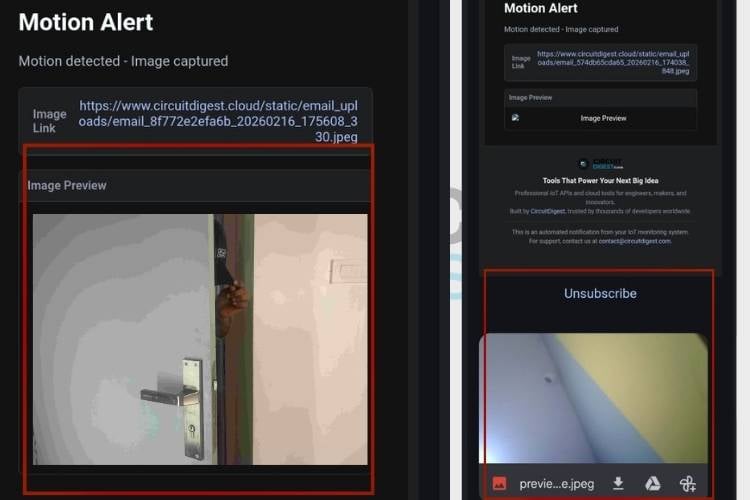
Email nhận được kèm ảnh chụp từ ESP32-CAM
7. Ứng dụng thực tế
- Bảo mật nhà ở — Giám sát và phát hiện xâm nhập trái phép, gửi ảnh ngay lập tức đến chủ nhà.
- Văn phòng & kho bãi — Theo dõi khu vực hạn chế, cảnh báo khi có chuyển động ngoài giờ làm việc.
- Giám sát công nghiệp — Kiểm soát khu vực nguy hiểm, ghi lại sự cố trong thời gian thực.
- Nông nghiệp thông minh — Phát hiện động vật hoặc người xâm nhập vào khu vực canh tác.
8. Xử lý sự cố thường gặp
❌ ESP32-CAM không kết nối được WiFi
Kiểm tra lại SSID và mật khẩu trong code. Đảm bảo cấp đủ nguồn 5V ổn định.
❌ Camera khởi động thất bại
Chọn đúng board AI Thinker ESP32-CAM trong Arduino IDE. Kiểm tra cấu hình chân camera.
❌ Không nhận được email
Kiểm tra API key và endpoint. Đảm bảo WiFi ổn định và payload đúng định dạng.
Nguồn tham khảo: How to Send Email Notifications using ESP32-CAM — CircuitDigest.com
Tin liên quan

Hướng dẫn điều khiển Servo Motor với ESP32 qua Web Server (Arduino IDE)
Bài hướng dẫn này giúp bạn xây dựng một web server bằng ESP32 để điều khiển góc quay của động cơ servo thông qua thanh trượt...

Hướng dẫn dùng cảm biến PIR với ESP32 (Interrupt & Timer millis())
Bài này hướng dẫn cách dùng cảm biến PIR với ESP32 để phát hiện chuyển động bằng Interrupt (ngắt) và Timer (bộ đếm thời gian millis())....

Hướng dẫn cài đặt VS Code và PlatformIO IDE để lập trình ESP32/ESP8266
Bài viết này hướng dẫn cài đặt và sử dụng VS Code + PlatformIO IDE để lập trình ESP32 và ESP8266 — một môi trường lập...

Hướng dẫn cài đặt ESP32 vào Arduino IDE (Windows, Linux, macOS)
Bài viết này hướng dẫn chi tiết cách cài đặt board ESP32 vào Arduino IDE để bắt đầu lập trình ESP32. Đây là bước đầu tiên bắt buộc trước khi...

Hướng dẫn dùng cảm biến DHT11/DHT22 với ESP32 (Nhiệt độ & Độ ẩm)
Trong bài này, bạn sẽ học cách kết nối cảm biến DHT11 hoặc DHT22 với ESP32 để đọc nhiệt độ và độ ẩm bằng Arduino IDE....